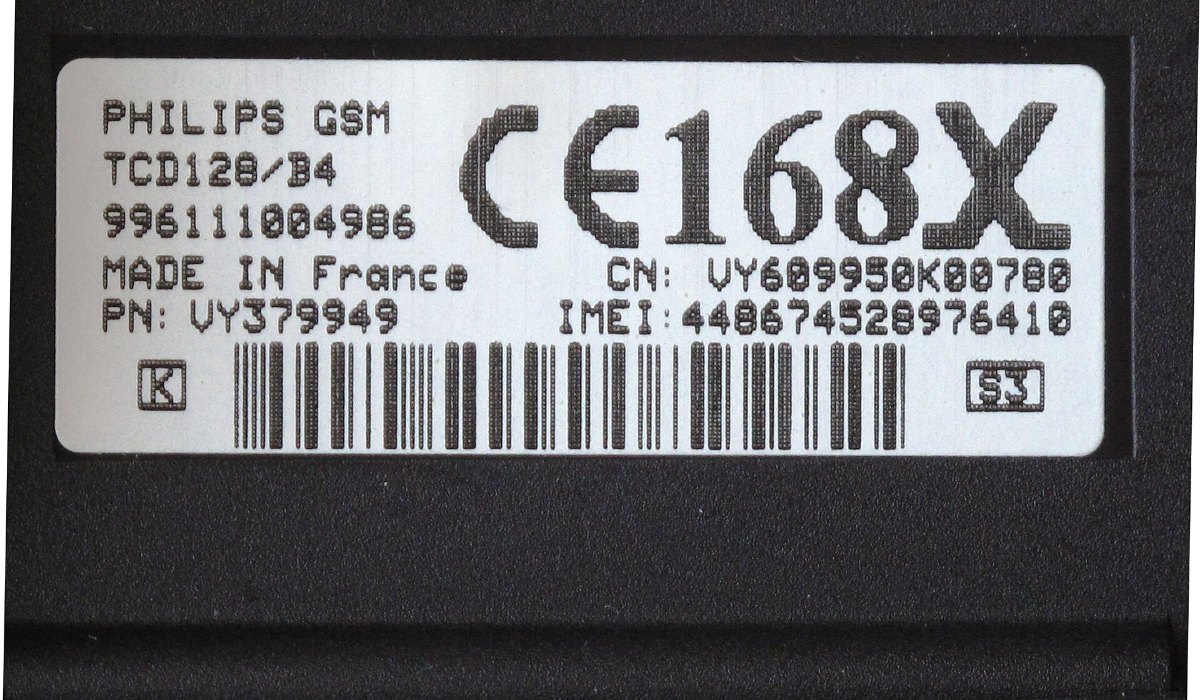
You can check whether a mobile phone is genuine by verifying its IMEI number on the Department of Telecommunications’ Sanchar Saathi service, either by SMS to 14422, on the website or in the app. It takes under two minutes and is worth doing as soon as a phone is delivered during the festive sales, or before you pay for a second-hand phone.
The check confirms that the IMEI belongs to a real, registered handset and shows its brand and model, so you can match it with the phone in your hand. Here is how to do it.
What an IMEI number is
IMEI (International Mobile Equipment Identity) is a 15-digit number that identifies a phone on mobile networks. Every phone sold legally in India has one, and dual-SIM phones have two, one for each SIM slot.
Fake or tampered phones often carry a cloned IMEI or one that does not match the model. Phones reported lost or stolen are blocked by IMEI through the government’s CEIR system, which is part of Sanchar Saathi.
Step 1: Find the phone’s IMEI
- Dial *#06# on the phone. The IMEI numbers appear on screen. This is the most reliable method, because it reads the number from the device itself.
- On Android, you can also look under Settings > About phone.
- On iPhone, go to Settings > General > About.
- Compare the number with the one printed on the box and the invoice. All three should match.
Step 2: Check the IMEI by SMS
This is the quickest method and works from any phone.
- Open your messaging app.
- Type KYM followed by a space and the 15-digit IMEI, for example: KYM 123456789012345.
- Send it to 14422.
- You will get a reply with the device details linked to that IMEI.
Step 3: Or check on the Sanchar Saathi website
- Go to sancharsaathi.gov.in and open Citizen Centric Services.
- Select Know Genuineness of Your Mobile Handset (KYM).
- Enter your mobile number and the captcha, then request an OTP.
- Enter the OTP, type the 15-digit IMEI and submit.
The same check is available in the Sanchar Saathi app on the Google Play Store and Apple App Store.
Step 4: Read the result
The result shows the device’s brand, model, manufacturer and type. Here is how to act on what you see:
| What the result shows | What to do |
|---|---|
| Brand and model match your phone | Good sign. The IMEI is registered to that handset. |
| Brand or model does not match | Do not accept the phone. Raise a return or replacement request with the seller. |
| Blacklisted | The phone has been reported lost or stolen. Do not buy it. |
| Duplicate or already in use | Stop and ask the seller to explain. Check again before you pay. |
| Invalid or no record | Recheck the digits. If it still fails, treat the phone as suspect. |
For dual-SIM phones, check both IMEI numbers separately.
When to run the check
- New phone from an online sale: check it on the day of delivery, while the return window is open. Record an unboxing video as well, in case you need to raise a claim.
- Second-hand or refurbished phone: check before you pay, in front of the seller.
- Phone bought from a local shop: check before leaving the store and keep the GST invoice.
Other quick checks on a new phone
- Register the phone on the brand’s official website or app to confirm the warranty start date. A warranty that started weeks before your purchase may mean the phone was used or a display unit.
- Make sure the phone was not already set up with someone else’s Google or Apple account.
Check the SIM connections in your name too
If the new phone comes with a new SIM, or you have handed an old number back, Sanchar Saathi has a second free check worth running. The Know Mobile Connections in Your Name service (also called TAFCOP) lists every mobile number registered against your identity.
You log in with an OTP on your own number. If you see a connection you do not recognise or no longer use, you can report it from the same page. A person can hold up to nine mobile connections in most of India, and up to six in Jammu and Kashmir, Assam and the North Eastern states, so an unknown number on your list is worth flagging quickly.
If you lose the phone later
Sanchar Saathi also lets you block a lost or stolen phone across all Indian networks through its CEIR service, after filing a police report. Keep a note of both IMEI numbers somewhere other than the phone, such as an email to yourself, so you have them if you ever need to block the device.
Setting up your new phone after the check? See our guides on moving data from Android to iPhone and blocking spam texts on iPhone.
Frequently asked questions
How do I check my phone’s IMEI by SMS?
Send an SMS in the format KYM followed by a space and the 15-digit IMEI number to 14422. You will receive the device details linked to that IMEI.
How do I find my phone’s IMEI number?
Dial *#06# on the phone. You can also find it in Settings under About phone on Android, or Settings > General > About on iPhone.
What does it mean if an IMEI is blacklisted?
A blacklisted IMEI usually means the phone has been reported lost or stolen and blocked through the CEIR system. You should not buy such a phone.
Is the Sanchar Saathi IMEI check free?
Yes. The KYM check on the Sanchar Saathi website and app is free. The SMS to 14422 is a standard text message.